What you need to know
The Numbers
4x Faster → Generation speed
50% Cheaper → Cost per image
↑ Better Quality → Higher fidelity output
4K Resolution →
Up to 4K output
My Take
Honest Review
Look. On paper, Nano Banana 2 is “just” a small upgrade. Faster, cheaper, same core model. But after spending hours testing it, I can tell you: this is a major step forward. The quality difference in cinematic and character work is immediately noticeable.
That said, it’s not a straight upgrade for everything. The new update introduces more background blur and higher contrast overall, which means if you’re doing UGC-style content or low-fidelity casual images, I still prefer Nano Banana Pro. Nano 2 tends to over-smooth things sometimes, and for that casual phone-camera look, Pro just feels more natural.
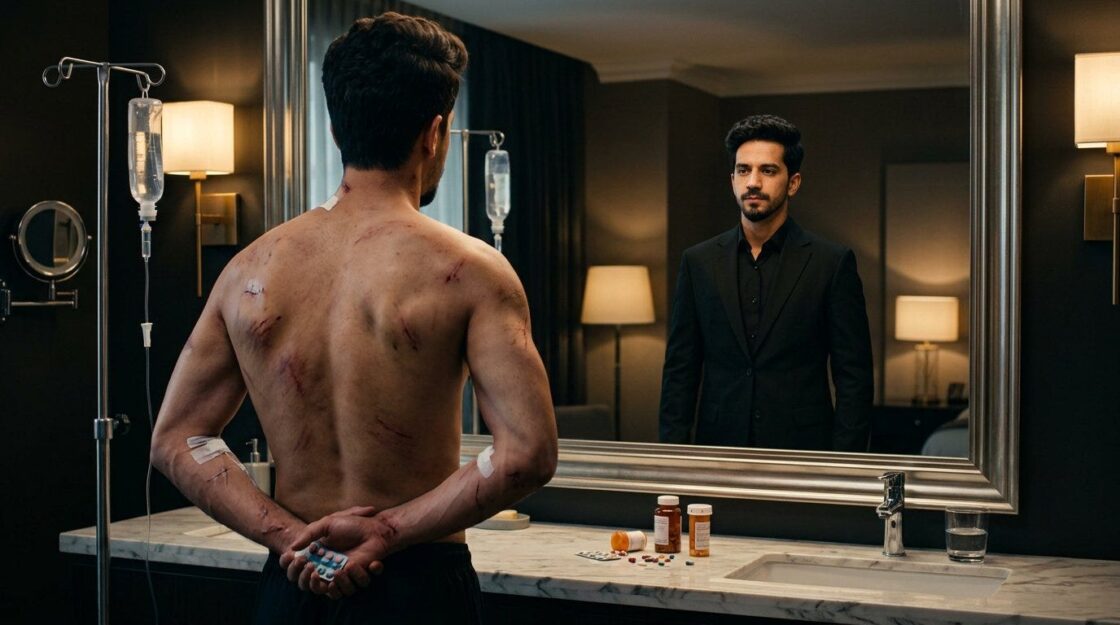
But for cinematic imagery (character consistency, medieval scenes, dramatic lighting, action shots), Nano 2 is where I’m spending all my time now. The detail in skin, textures, and lighting is noticeably better. The fact that it’s also faster and cheaper makes it even more of a no-brainer for these use cases.
Use Nano Banana 2 for
Cinematic scenes, character consistency, dramatic lighting, medieval/fantasy, action shots, high-detail portraits.
Stick with Nana Banana Pro for
UGC content, low-fidelity casual images, less smoothing, and more natural background focus.
What’s New
New Capabilities
Nano Banana 2 isn’t just faster. It has entirely new features that Pro never had.
✦ Text Rendering
Near-Perfect Text in Images
Nano Banana 2 can generate accurate, legible text inside images. Magazine layouts, posters, infographics, and greeting cards. It also supports in-image translation for multi-language localization. Pro couldn’t do this reliably.
✦ Web Grounding
Real-Time Knowledge
The model pulls from real-time web search during generation. It can accurately render logos, landmarks, recent events, and brand identities by accessing current information instead of relying only on training data.
✦ Multi-Reference
5 Characters, 14 Objects
Maintains character resemblance across up to 5 subjects and preserves visual fidelity for up to 14 objects in a single workflow. Perfect for storyboarding and building narratives without altering the appearance of your inputs.
✦ Reasoning Modes
Minimal / High / Dynamic
Configurable reasoning levels let you control how much the model “thinks” before generating. Use minimal for speed, high for complex scenes with multiple subjects, and dynamic to let the model decide.
✦ Resolution
512px to 4K Native
Generate images from 512px all the way up to 4K resolution natively. Supports multiple aspect ratios: 1:1, 4:5, 9:16, 16:9, 2.39:1 and more.
→ Skin Tones
Higher Fidelity
Warmer, more natural skin color with richer tonal variation across the face and body.
✦ Nano Banana 2 has more natural.
→ Influencer / Portrait
Realistic Portraits
Sharper facial detail, more natural lighting, and better overall composition for portrait-style content.
✦ Nano Banana 2 has higher detail.
Prompt Guide ↘
The Full Prompt
This is the exact prompt structure that produces the best results with Nano Banana 2. Copy it and swap in your own details.
Ultra-realistic iPhone video still of a young woman in her early 20s, waist-up, filmed from eye level approximately 3 feet away, 9:16 vertical frame. She stands in front of a white sheer curtain backdrop with soft window light filtering through.
Her skin shows visible pores, natural texture, bare skin with zero makeup, slight natural sheen on the forehead and nose, fine baby hairs along the hairline. She is mid-sentence, mouth slightly open, eyes engaged with the camera.
Soft diffused window light wraps around her face with gentle catch lights in her eyes.
Shot on rear camera lens with native color science, low ISO, no filters, no beauty mode, no skin smoothing.
4K footage quality with natural motion blur on micro-movements.
Prompt Anatomy ↘
How the Prompt Works
Every strong prompt follows this 8-part structure. Each layer adds specificity that Nano 2 uses to generate more realistic output.
-
Format + Medium
“Ultra-realistic iPhone video still of…” This anchors the model to a specific visual style. Saying “iPhone video still” triggers realistic color science, slight compression artifacts, and that phone-camera look. Alternatives: “35mm film photograph,” “DSLR portrait shot,” “drone footage frame.”
-
Subject + Age
“a young woman in her early 20s” Be specific about the subject. Age range, gender, and any distinguishing features help the model lock in facial structure. The more specific, the more consistent the output.
-
Camera + Framing
“waist-up, eye level, 3 feet away, 9:16” This controls composition. Specify the crop (waist-up, headshot, full body), angle (eye level, low angle), distance from subject, and aspect ratio. This is what separates amateur prompts from pro ones.
-
Scene + Setting
“white sheer curtain backdrop, window light” The environment drives mood. Describe the background, location, and ambient conditions. Nano 2 handles complex scenes better than Pro, so don’t be afraid to get detailed.
-
Micro-Details
“visible pores, bare skin, baby hairs” This is where Nano 2 really shines. Calling out skin texture, tiny hairs, fabric weave, or surface imperfections forces the model to generate hyper-realistic detail instead of smooth AI-looking skin.
-
Expression + Action
“mid-sentence, mouth slightly open” Static faces look AI-generated. Adding a micro-action (mid-sentence, looking away, laughing, squinting) makes the output feel candid and alive. Nano 2’s emotion rendering is significantly better than Pro.
-
Lighting
“soft diffused window light, catch lights” Lighting sells realism. Specify the light source (window, golden hour, overhead fluorescent), quality (soft, harsh, diffused), and small details like catch lights in the eyes or rim lighting on the hair.
-
Negative Cues
“no filters, no beauty mode, no skin smoothing” Telling the model what NOT to do is just as important. This prevents the AI-smoothed, over-processed look. Always end with negative cues to push the output toward realism.
Prompt Guide ↘
Keywords That Work
Drop these into your prompts. Blue tags have the highest impact on output quality.
Realism Anchors
ultra-realistic | iPhone video still | filmed from | native color science | 4K footage
Skin + Detail
visible pores | bare skin | zero makeup | natural sheen | fine baby hairs
Lighting + Camera
soft diffused light | catch lights in eyes | rear camera lens | low ISO
Expression + Motion
mid-sentence | micro-expression | engaged gaze
Negative Prompting
no filters | no beauty mode | no skin smoothing | no text overlays
Copy & Paste
Ready-to-Use Prompts
Three tested prompts for different use cases. Copy, paste, and adjust to your needs.
Portrait / Influencer
Natural Selfie Look
Ultra-realistic iPhone video still of a young woman in her early 20s, waist-up, filmed from eye level approximately 3 feet away, 9:16 vertical frame.
She stands in front of a white sheer curtain backdrop with soft window light filtering through. Her skin shows visible pores, natural texture, bare skin with zero makeup, slight natural sheen on forehead and nose, fine baby hairs along the hairline. She is mid-sentence, mouth slightly open, eyes engaged with the camera. Soft diffused window light wraps around her face with gentle catch lights in her eyes. Shot on rear camera lens with native color science, low ISO, no filters, no beauty mode, no skin smoothing.
4K footage quality.
Copy and adjust subject details
Cinematic / Character
Medieval Warrior Scene
Cinematic 16:9 film frame of a weathered medieval warrior in heavy plate armor standing in a torch-lit stone corridor.
Close-up from chest level, shallow depth of field. Scarred face with visible stubble, sweat beads on the forehead, blood-spattered armor with dented metal texture.
Intense eyes locked on something off-camera, jaw clenched. Warm torch light from the left casting deep shadows, rim light from a window behind.
Shot on anamorphic lens with natural film grain, slight lens flare from the torch. No CGI look, no clean skin, no smooth surfaces.
Copy and adjust character + scene
Character Consistency / Medieval
Medieval Character: Full Pipeline
This is an advanced 3-phase prompt for generating cinematic medieval characters from a reference image. Attach your source image where it says @img1.
Cinematic film still, Cooke Anamorphic 70mm T2.0, 2.39:1.

DIRECTIVE:
Perform a deep visual and psychological decomposition of the attached reference image @img1 to generate a high-fidelity, cinematic “Real Footage” version of the subject as a character in an original Dark Medieval Fantasy series. Discard the original background entirely.

PHASE 1: LINEAGE & PSYCHOLOGY:
NOBLE OR COMMONER: Analyze facial structure and gaze to infer a social archetype: Disgraced Knight.
PERSONALITY BIOME: Based on the character’s expression, autonomously select a fitting climatic environment: a frozen tundra fortress.
ATTRIBUTES: Identify defining facial features, scars, or eye intensity to be enhanced with hyper-realistic textures: grime.
MATERIAL COHERENCE: Infer a wardrobe based on the perceived rank: heavy fur, hand-forged weathered steel, intricate brocade silk, or boiled leather.

PHASE 2: CINEMATIC RE-IMAGINATION:
SUBJECT: An original character directly @img1 derived from the reference’s likeness.
CRITICAL: Facial features and soul-expression must STRICTLY match the reference image @img1, but aged and weathered by the medieval setting.
SCENE & ACTION: A candid cinematic still captured “on set.” The character is mid-action or in a tense moment of dialogue with an internal monologue expression.
STRICT PROHIBITION: No high-fantasy tropes, no neon armor. Do not evoke existing IPs. No GoT. Keep it grounded and gritty.

PHASE 3: TECHNICAL SPECS:
STYLE: 35mm film still, “Real Footage” aesthetic, high-end TV production quality.
LIGHTING: Naturalistic, moody lighting (chiaroscuro). Use Golden Hour or firelight to create depth and shadows.
CAMERA: Arri Alexa look, anamorphic lenses, shallow depth of field (bokeh), slight motion blur.
TEXTURES: Focus on tactile realism: leather grain, rust on mail, damp skin, fabric weave detail.
NEGATIVE PROMPT: CGI, video game render, plastic skin, clean clothes, bright saturated colors, magic spells, floating islands, anime, cartoon, 3D model, watermark, stock photo.

Crushed blacks, warm amber highlights, teal in shadows. Blurred figures in background, oval anamorphic bokeh. Film grain. Direct gaze, calm intensity.
Texture pass should feel physically real: skin pores, fabric weave, dust, stone, metal, wood, all enhanced without plastic smoothing.
Maintain cinematic depth of field consistent with the original image. Natural lens falloff.
Copy and adjust archetype, environment + wardrobe
Cinematic / Fighting
Underground Boxing Scene
Cinematic film still, Cooke Anamorphic 70mm T2.0, 2.39:1.
Cinematic medium close-up movie still of a man @img1 sitting on a corner stool in a dimly lit underground boxing ring between rounds.
His face is tilted slightly upward and to the left, eyes half open staring into the middle distance with exhausted defiance.
His mouth is parted, breathing heavy, a thin stream of blood running from a cut above his left eyebrow down across his cheekbone.
His skin glistens with sweat under the single overhead tungsten ring light that creates a hot golden pool of light on his face and bare shoulders while everything else falls into darkness.
His hands are wrapped in fraying white hand wraps resting on his knees visible at the bottom of frame.
A cutman’s hand enters the frame from the right pressing a cold compress against his cheek but his gaze is distant, locked on his opponent across the ring barely visible as a dark silhouette through the ropes.
Cigarette smoke drifts from the crowd creating hazy volumetric layers in the background.
Shot on 35mm Kodak Vision3 500T film stock with natural warm grain, shallow depth of field, rich amber and deep shadow color grade with no fill light.
His expression reads as a man deciding whether to quit or go back for more. 16:9 widescreen, photorealistic.
Crushed blacks, warm amber highlights, teal in shadows. Blurred figures in background, oval anamorphic bokeh. Film grain. Direct gaze, calm intensity.
Texture pass should feel physically real: skin pores, fabric weave, dust, stone, metal, wood, all enhanced without plastic smoothing.
Maintain cinematic depth of field consistent with the original image. No artificial blur.
Copy and adjust character + scene details
Action / Dynamic
Explosion Scene
Ultra-realistic 16:9 action movie frame of a man running toward camera through a massive explosion behind him.
Full body shot, low angle, motion blur on his legs. Debris and sparks flying through the air, orange and red fire engulfing the background.
His face shows fear and determination, mouth open mid-yell, sweat visible on skin.
Shot on high-speed cinema camera at 120fps, slight motion blur, dust particles catching the firelight.
Natural film grain, no CGI look, no clean compositing, raw footage feel. 4K resolution.
Copy and adjust action + setting
Identity ↘
Stronger Identity Lock
More consistent character resemblance and facial features across multiple outputs.
✦ Nano Banana 2 has better resemblance.
Character ↘
Character Consistency
Better facial identity lock across poses and scenes.
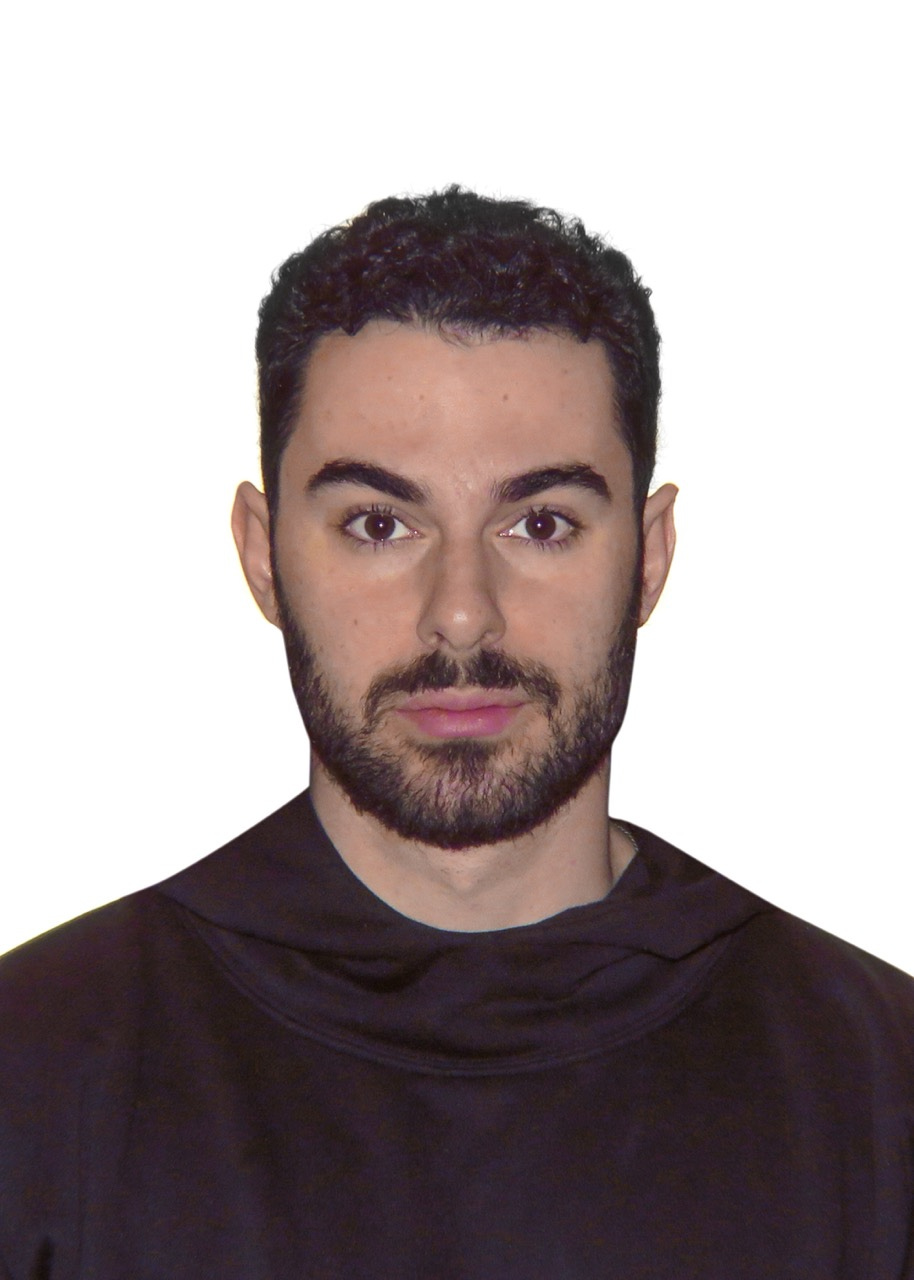
Cleaner textures in skin, hair, and fabric. Less compression artifacts in high-detail areas.
✦ Nano Banana 2 has better resemblance.
Cinematography ↘
Cinematic Quality
Richer lighting, more atmospheric depth and better color grading in scene composition.
✦ Nano Banana 2 has better lighting.
Emotions ↘
Better Emotions
More convincing emotional expressions with cleaner detail and reduced image noise.
✦ Nano Banana 2 has sharper emotions.
Movement ↘
Cleaner Action Shots
Reduced noise with better motion clarity and sharper details in fast-paced dynamic scenes.
✦ Nano Banana 2 has less noise.
✦ Pro Tips!
Advanced Techniques
Workflows and techniques that separate good results from great ones.
-
Edit, Don’t Regenerate
If an image is 80% correct, never start from scratch. Use conversational edits to refine what you have. This saves time and keeps the elements that already work.
-
Collage Merging
Create a collage of reference images, feed it as one single input, and prompt it. Combine a person + an outfit + a location into one image. Works extremely well for compositing elements from different sources.
-
Style Consistency Grids
Prompt: “Create a grid of 4 editorial images focused on [brand], [style specs] matching the same color palette.” This forces the model to maintain visual consistency across multiple outputs in a single generation.
-
Describe What the Camera Sees
Nano 2 works best when prompts feel like visual instructions, not abstract ideas. Instead of “make it cinematic,” describe the lens, the framing, the light source, the film stock. The more specific you are about what the camera physically sees, the better.
-
Use High Reasoning for Complex Scenes
If your prompt has multiple characters, specific text, or detailed spatial relationships, switch to High reasoning mode. It takes longer but the accuracy jumps significantly. Use Minimal for simple single-subject portraits.
Summary
✦ What’s New
↘ Higher fidelity → IMPROVED!
(Sharper details, cleaner textures)
↘ Better skin tones → IMPROVED!
(Warmer, more natural skin color)
↘ Stronger identity → IMPROVED!
(Better character resemblance)
↘ Better emotions → IMPROVED!
(More convincing expressions)
↘ More background blur → Trade-off
(Slightly more background blur vs Pro)
Want more prompts & guides⁉️
Visit my Website → Musalas AI
Get access to exclusive prompts and workflows inside the How to AI community.
Join How to AI — It’s Free 💯
Catch you in the next one,
Your friend, iamsheek